Dynamic Island for Mac: does it exist, and how do you get one?
The iPhone's Dynamic Island turned a camera cut-out into a live status area. MacBooks have had a cut-out of their own since 2021, and macOS still leaves it empty. A Bloomberg report says new MacBook Pros may get one around October 27; until then, a third-party notch app is the only way to get a Dynamic Island on a Mac.
Does any Mac or MacBook have a Dynamic Island?
As of October 15, 2026, no Mac has a Dynamic Island. macOS 27, which Apple released on September 14, doesn’t add one, and Apple hasn’t announced one. The closest built-in feature is iPhone Live Activities in the menu bar, on macOS Tahoe 26 and later, if you use iPhone Mirroring.
That could change soon. MacRumors, citing Bloomberg, reports that Apple will launch touchscreen OLED MacBook Pros with a Dynamic Island on or around October 27. Apple hasn’t confirmed it. And on iPhone, the Dynamic Island arrived with new hardware and never came to older models, so Macs you can buy today shouldn’t count on getting it.
If you want one now, on any Mac, you need a notch app: a third-party app that turns the area around the camera into a panel that opens when you hover over it. We make one, NotchStack, so keep that in mind as you read. Our comparison of the best Mac notch apps covers every notable option, including free ones.
What the Dynamic Island actually is
Apple introduced the Dynamic Island with the iPhone 14 Pro on September 7, 2022. Instead of hiding the cut-out for the front camera, iOS draws a black shape around it that grows and shrinks. In Apple’s words, it adapts “in real time to show important alerts, notifications, and activities.”
On the iPhone it does three jobs:
- Live status. Background activities “like Maps, Music, or a timer remain visible and interactive” in a small pill.
- Quick controls. A tap-and-hold opens it into a bigger view with controls.
- System moments. It expands “into different shapes to clearly convey important activities like Face ID authentication.”
The camera has to go somewhere, so iOS uses that space instead of hiding it.
The Mac’s version of the cut-out: the notch
The first Mac with a notch was the 14-inch and 16-inch MacBook Pro, announced on October 18, 2021. Apple said its display “extends up around the camera to provide users with even more room for their content.” The MacBook Air followed with the M2 model in June 2022. Its display was “expanded closer to the sides and up around the camera to make room for the menu bar.”
Apple doesn’t call it a notch. Its support pages call it a “camera housing built into the screen bezel.” Whatever the name, it sits in the middle of the menu bar, and for most of its life macOS has treated it as a gap to work around. For apps that misbehave near it, Apple’s fix is a per-app checkbox: open the app’s Get Info window in Finder and select Scale to fit below built-in camera, and the menu bar and windows stay below the camera while that app runs.
Not every Mac has one:
| Mac | Notch? |
|---|---|
| 14-inch and 16-inch MacBook Pro (2021 and later) | Yes |
| MacBook Air with Liquid Retina display (M2 from 2022, and later) | Yes |
| MacBook Neo (2026) | No, the camera sits in a thicker top bezel |
| MacBook Air M1, 13-inch MacBook Pro and older MacBooks | No |
| Mac mini, iMac, Mac Studio, Mac Pro and external displays | No |
So even if Apple ships a Dynamic Island, the Macs in the last three rows of this table have no cut-out to build one around.
What macOS does around the notch in 2026
macOS has two built-in features close to a Dynamic Island, and neither turns the notch into something you can open: iPhone Live Activities in the menu bar (macOS Tahoe 26 and later) and a menu bar that hides overflow items behind an indicator (macOS 27).
Live Activities in the menu bar (macOS Tahoe 26 and later). When your Mac is connected to your iPhone through iPhone Mirroring, “Live Activities from your iPhone appear in the menu bar.” Depending on how much room the menu bar has, you see “either a small Live Activity icon” or a compact view, and clicking it shows more. You can turn it off in System Settings → Notifications → Allow Live Activities from iPhone. iPhone Mirroring needs macOS Sequoia 15 and iOS 18 or later, and Apple says it’s “currently unavailable in the European Union.” These are your iPhone’s activities, shown as menu bar items. Nothing grows out of the notch.
A menu bar that makes room (macOS 27). Apple’s notes for macOS 27 say “the macOS menu bar dynamically adapts when there isn’t enough space to show every item.” Hidden items are “replaced with a compact overflow indicator that surfaces the hidden items when pressed.” Apple doesn’t mention the notch here. But on a notched MacBook the camera takes the middle of the menu bar, so items run out of room sooner, and that’s where you’re most likely to see the indicator.
Those are the only two we found in Apple’s documentation. Apple’s September 14 announcement of macOS 27 and its other software updates doesn’t mention the notch, the Dynamic Island or Live Activities.
| Feature | iPhone Dynamic Island | Mac, built in (macOS 27) | Mac with a notch app |
|---|---|---|---|
| Live status around the camera | Yes | No (iPhone activities appear as menu bar items) | Yes, depending on the app |
| Opens into a larger panel | Yes, tap and hold | No | Yes, on hover or click |
| Works without a camera cut-out | — | — | Many apps draw a floating notch |
| Price | Included | Included | Free to about $20 |
Will the MacBook Pro get a Dynamic Island?
Possibly, as soon as October 27, 2026. On October 8, MacRumors reported, citing Bloomberg, that Apple will launch new 14-inch and 16-inch MacBook Pro models “on or around” October 27 that “will have OLED displays, touchscreen capabilities, and a Dynamic Island.” Apple hasn’t confirmed it.
On October 12, Appleosophy, relaying a post by Bloomberg’s Mark Gurman, added that Apple plans a two-day press “Apple Experience” in Los Angeles: the evening of October 27 and across October 28. It says to expect press releases rather than a live-streamed event. Apple hasn’t confirmed that either, so the announcement could land on either day.
Keep three things in mind:
- It’s a report, not an announcement. Apple doesn’t comment on unreleased products until it launches them.
- On iPhone, it came with new hardware. The Dynamic Island debuted on the iPhone 14 Pro and never came to earlier iPhones through a software update. If the Mac follows that pattern, the notched MacBooks people already own keep their notch.
- Desktops have nothing to build on. A Mac mini, an iMac or an external display has no camera cut-out.
So even in the best case, most Macs in use won’t get one. We’ll update this post after Apple’s announcement.
How to get a Dynamic Island on your Mac today
To get a Dynamic Island on a Mac today, install a third-party notch app. Most work the same way: the app draws a black shape over the notch that matches its curves, so it looks like part of the hardware. Hover over it or click it and it expands into a panel; move away and it shrinks back. On Macs without a notch, many apps draw a floating notch at the top centre of the screen instead.
Setting one up takes a few minutes. Here’s how it goes with NotchStack:
- Install it. Download the free trial from notchstack.app, open the disk image and drag NotchStack to Applications. It’s signed with an Apple Developer ID and notarized by Apple, so macOS opens it after the usual one-time “downloaded from the Internet” confirmation, with no “unidentified developer” block.
- Choose how it opens. The welcome window asks whether the notch opens on hover or on click, and you can set the hover delay. ⌃⌥⌘Space opens it from anywhere.
- Pick a look and your tools. There are three themes: Minimal, Playful and Neon. Turn on only the tools you’ll use. You can drag them into a different order later in Settings, and the dock inside the notch follows.
- Allow only what you need. Calendar and Reminders, Camera (for the Mirror tool) and Music or Spotify are optional permissions. Each tool asks again the first time you open it.
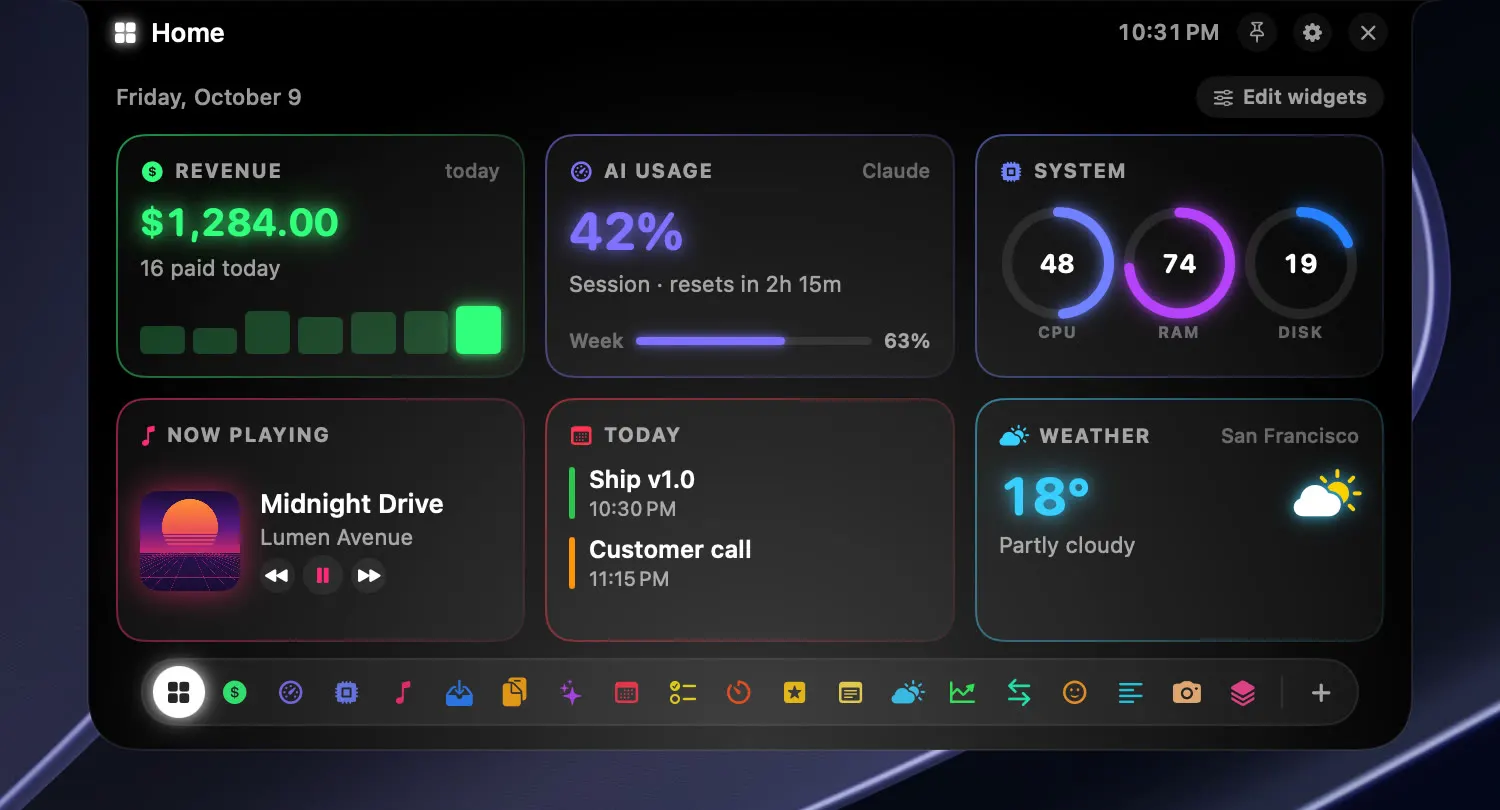
- Hover the notch. Home opens with six live cards, and the dock along the bottom switches between tools.
On a Mac mini, an iMac or an external display, the steps are the same and NotchStack draws a floating notch. Our guide to getting a notch on a Mac without one covers the display options in detail.
What a Mac Dynamic Island is good for
On iPhone, the island mostly shows things running in the background. A Mac has a pointer and a keyboard, so a notch app works better as a home for things you check all day. These are the uses that make the most sense:
- Music. Artwork and playback controls without switching to Music or Spotify.
- Files. A shelf in the notch to park a file while you move between windows, then drop it where it needs to go.
- Time. A timer, a focus session, or a glance at your next calendar event.
- Clipboard. Everything you copied, searchable, a click away from being pasted again.
- Work signals. If you build with AI coding agents: your Claude Code and Codex usage limits, plus an alert when an agent finishes or needs you. If you sell online: today’s revenue from Stripe or Dodo Payments, shown next to the notch even when it’s closed.
Plenty of notch apps handle music and files well. NotchStack’s focus is the last group, the numbers developers and indie founders keep checking in other tabs. See all of NotchStack’s features.
Free and paid Dynamic Island apps for Mac
You can get a Dynamic Island on a Mac for free with open-source apps like Boring Notch and DynamicNotch; paid apps are one-time purchases of roughly $10 to $20. Prices below come from our comparison of the best Mac notch apps, checked on each app’s website on October 9, 2026:
- Boring Notch: free and open source (GPL-3.0). Music, calendar and a file shelf with AirDrop.
- DynamicNotch: free and open source. A floating capsule on Macs without a notch.
- Alcove: $14.99, one-time. Music, HUDs and Lock Screen widgets. Needs macOS 15.
- NotchStack (ours): €9.99, one-time, with a 3-day free trial. 19 tools. Needs macOS 14.
- OmniNotch: $19.99 (on sale for $9.99 when we checked). Twenty tools.
One app you’ll see in older articles is NotchNook. As of October 9, 2026, its product page returns an error and it isn’t sold; its makers, lo.cafe, say NOOTCH, now in closed beta, replaces it.
Common questions
Does the MacBook Pro have a Dynamic Island?
Not yet. Today’s 14-inch and 16-inch MacBook Pro have a camera notch, not a Dynamic Island. Bloomberg reports that new OLED MacBook Pros may add one around October 27, but Apple hasn’t confirmed it. Until then, a third-party notch app is the only way to get one on a MacBook.
What is the best Dynamic Island app for Mac?
It depends on what you want in the notch. Boring Notch is free and covers music, calendar and a file shelf. Alcove ($14.99) is the most polished for music and HUDs. OmniNotch has the most tools. NotchStack, which we make, is built for developers and indie founders. Prices and details are in our comparison of the best Mac notch apps.
Does macOS 27 have a Dynamic Island?
No. macOS 27 adds a menu bar overflow indicator for items that don’t fit, but nothing that expands from the notch. Apple’s September 14 announcement of macOS 27 doesn’t mention the notch or the Dynamic Island.
Can I see iPhone Live Activities on my Mac?
Yes, on macOS Tahoe 26 or later, if your Mac and iPhone support iPhone Mirroring. Once it’s set up, your iPhone’s Live Activities appear in the Mac’s menu bar. You can turn them off in System Settings → Notifications → Allow Live Activities from iPhone. Apple says iPhone Mirroring is currently unavailable in the European Union.
Can I get a Dynamic Island on a Mac mini or an external display?
Yes, with a notch app that draws its own notch at the top of the screen. NotchStack, OmniNotch and DynamicNotch draw a floating notch, and Alcove offers a pill shape for displays without a notch.
Do notch apps slow down a Mac?
A well-made one shouldn’t. We measured NotchStack at 0% CPU with the notch closed, on a Mac mini (M4) with an optimised build. Opening a tool uses a little CPU while it draws, then settles. That’s one Mac, not a benchmark, so check Activity Monitor on yours: if a notch app keeps using CPU while you’re not touching it, try another.
Will notch apps still matter if Apple ships a Dynamic Island?
For most Macs, yes. Older notched MacBooks, the MacBook Neo and every desktop Mac would still need an app. A notch app can also hold tools Apple doesn’t make, such as your revenue or your AI usage limits.
Sources
- Apple Newsroom: Apple unveils game-changing MacBook Pro (October 18, 2021)
- Apple Newsroom: Apple unveils all-new MacBook Air, supercharged by the new M2 chip (June 6, 2022)
- Apple Newsroom: Apple debuts iPhone 14 Pro and iPhone 14 Pro Max (September 7, 2022)
- Apple Support: How to adjust an app’s settings to appear below the camera area on your MacBook Air or MacBook Pro
- Apple Support: Manage iPhone notifications and Live Activities on Mac
- Apple Support: iPhone Mirroring: Use your iPhone from your Mac
- Apple Support: What’s new for enterprise in macOS Golden Gate 27
- Apple Newsroom: Major updates for Apple’s software platforms are now available (September 14, 2026)
- MacRumors: Apple to Launch Touchscreen OLED MacBook Pro and OLED iPad mini on October 27 (October 8, 2026)
- TechRadar: 7 features the MacBook Neo is missing
NotchStack’s setup steps and the CPU figure come from our own app and measurements. Other apps’ prices come from our comparison.